A LangChain agent in a container is, by default, anonymous software: it calls a model with a shared key, anyone who can reach its endpoint can use it, and nobody outside the engineering team can see what it did.
This article walks through the calls that change that. After them the agent:
- has its own identity in Microsoft Entra, with a named owner and sponsor;
- accepts calls only from people Entra has been told may use it;
- calls the model as itself, with no key or secret stored anywhere;
- sends every request, model call and tool call to Agent 365, which makes it visible in Microsoft Purview, Microsoft Defender and the Microsoft 365 admin center.
The focus is the API and SDK calls: which ones, in what order, and what goes wrong if the order changes. Hosting details (networking, CI/CD, Terraform layout) are left out on purpose.
Status of the APIs. Entra Agent ID and the Agent Registration API were in preview when this was written (October 2026). Names, permissions and endpoints may change; check the current Microsoft documentation before relying on them.
Conventions
Values in angle brackets are placeholders: <tenant-id>, <blueprint-app-id>, <agent-identity-id> and so on. Nothing in this article is specific to one environment.
Three identifiers below are constants published by Microsoft, the same in every tenant:
| Constant | Value |
|---|---|
| Azure CLI client application | 04b07795-8ddb-461a-bbee-02f9e1bf7b46 |
| Agent 365 observability API | 9b975845-388f-4429-889e-eab1ef63949c |
| “Default access” app role | 00000000-0000-0000-0000-000000000000 |
The moving parts
| Part | What it is |
|---|---|
| Agent identity blueprint | An Entra application object of type agentIdentityBlueprint. It is the template and the credential holder for one or more agent identities. |
| Blueprint principal | The service principal of the blueprint in the tenant. Access assignments are made against it. |
| Agent identity | A service principal of type agentIdentity. This is “who the agent is” when it calls a model or sends telemetry. |
| Sponsor / owner | The business person accountable for the agent, and the technical person who manages it. |
| Entra auth sidecar | The Microsoft Entra SDK for Agent ID, shipped as a container (mcr.microsoft.com/entra-sdk/auth-sidecar). It runs next to the agent and does all token work over localhost. |
| Agent 365 observability SDK | The microsoft-opentelemetry Python package. It instruments LangChain and exports to Agent 365. |
| Managed identity | The Azure identity of the Container App. It is the only “credential” in the system, and it is not a secret. |
The whole flow in one picture
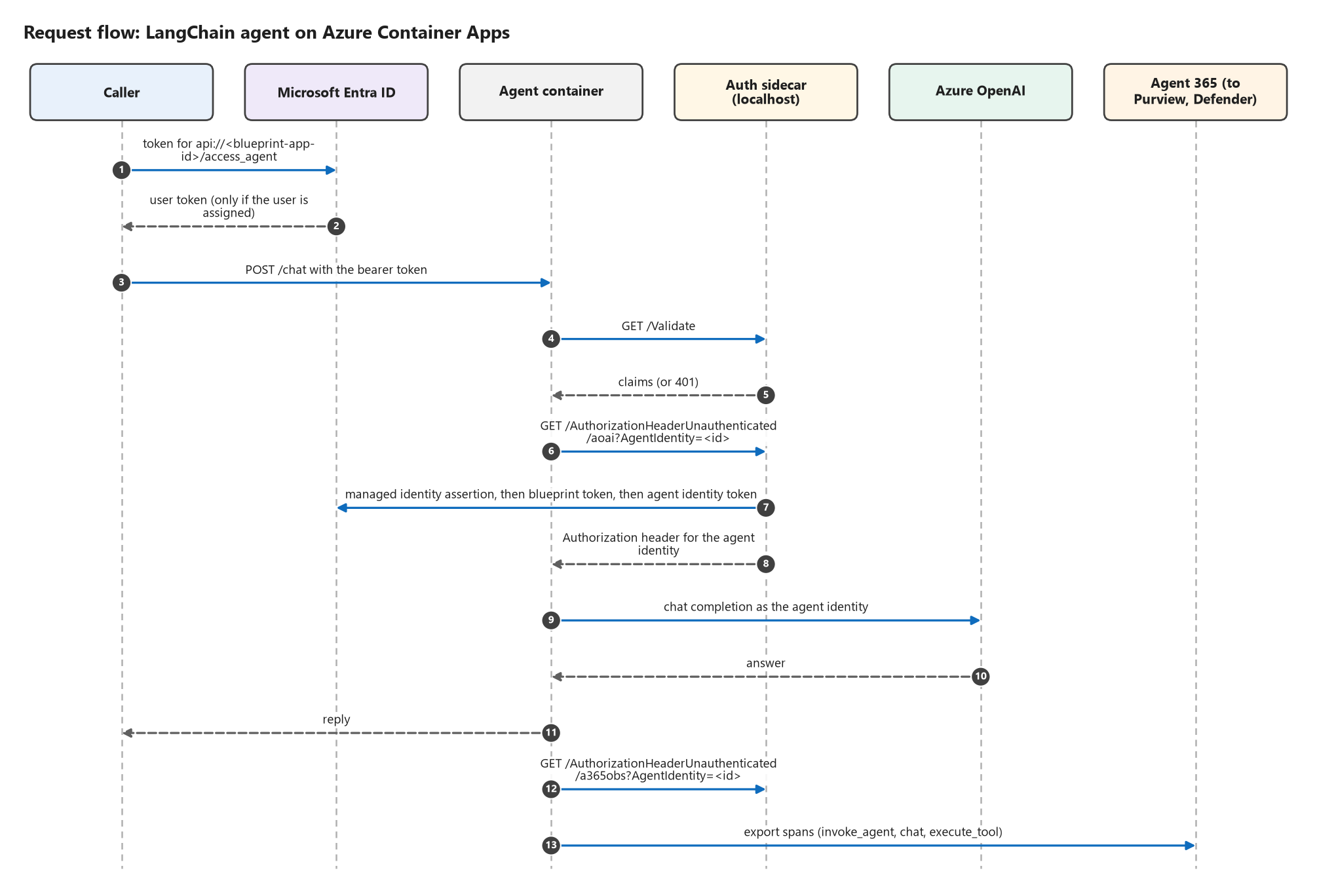
The calls fall into four phases. Each phase depends on the one before it.
| Phase | When | Who runs it | API or SDK |
|---|---|---|---|
| 1. Register | Once per agent | Deployment pipeline | Microsoft Graph |
| 2. Govern | Once per agent | Tenant administrator | Microsoft Graph, Azure RBAC |
| 3. Secure | Every request | The agent | Microsoft Entra SDK for Agent ID (sidecar) |
| 4. Observe | Every request | The agent | Agent 365 observability SDK |
Prerequisites
- A tenant with Entra Agent ID and Agent 365 available, and the licensing they require.
- A user who will be the agent’s sponsor.
- A user-assigned managed identity attached to the Container App.
- An identity for the deployment pipeline with these Microsoft Graph application permissions (admin consent required):
AgentIdentityBlueprint.Create
AgentIdentityBlueprint.Read.All
AgentIdentityBlueprint.AddRemoveCreds.All
AgentIdentityBlueprint.UpdateAuthProperties.All
AgentIdentityBlueprint.DeleteRestore.All
AgentIdentityBlueprintPrincipal.Create
AgentIdentityBlueprintPrincipal.Read.All
AgentIdentityBlueprintPrincipal.DeleteRestore.All
AgentIdentity.Create.All
AgentIdentity.Read.All
AgentIdentity.DeleteRestore.All
AgentRegistration.ReadWrite.All
AccessReview.ReadWrite.All
The Phase 2 steps need more: AppRoleAssignment.ReadWrite.All and AgentIdentityBlueprintPrincipal.ReadWrite.All. Keep those with an administrator instead of the pipeline, so the pipeline cannot grant access to itself or others.
The examples use az rest, which signs requests with the signed-in identity. Any HTTP client with a Graph token works the same way.
Phase 1: Register the agent (Microsoft Graph)
Six calls. The order is fixed because each one needs an id produced by an earlier one.
1.1 Create the agent identity blueprint
az rest --method POST --url "https://graph.microsoft.com/v1.0/applications" \
  --headers "Content-Type=application/json" --body '{
    "@odata.type": "#microsoft.graph.agentIdentityBlueprint",
    "displayName": "<agent-name>-blueprint",
    "sponsors@odata.bind": ["https://graph.microsoft.com/v1.0/users/<sponsor-object-id>"]
  }'
Why: everything else hangs off the blueprint. It will hold the credential, expose the API that callers request tokens for, and be the parent of the agent identity.
Details that matter:
- The
@odata.typeis what makes this a blueprint and not an ordinary app registration. Without it you get a normal application and the later calls fail. - A sponsor is given at creation. An agent with nobody accountable for it is the thing governance is meant to prevent.
- Save two values from the response:
id(the object id) andappId.
1.2 Expose an API on the blueprint
Callers will ask Entra for a token whose audience is the blueprint. That needs an application ID URI and a scope.
az rest --method PATCH --url "https://graph.microsoft.com/v1.0/applications/<blueprint-object-id>" \
  --headers "Content-Type=application/json" --body '{
    "identifierUris": ["api://<blueprint-app-id>"],
    "api": { "oauth2PermissionScopes": [{
      "id": "<new-guid>", "value": "access_agent", "type": "User", "isEnabled": true,
      "adminConsentDisplayName": "Access <agent-name>",
      "adminConsentDescription": "Allow the application to call <agent-name> on behalf of the signed-in user.",
      "userConsentDisplayName": "Access <agent-name>",
      "userConsentDescription": "Allow the application to call <agent-name> on your behalf."
    }]}
  }'
Then pre-authorize the client applications users will sign in with (here the Azure CLI), so they are not asked for consent:
az rest --method PATCH --url "https://graph.microsoft.com/v1.0/applications/<blueprint-object-id>" \
  --headers "Content-Type=application/json" --body '{
    "api": {
      "oauth2PermissionScopes": [ { "...": "the same scope object as above" } ],
      "preAuthorizedApplications": [{
        "appId": "04b07795-8ddb-461a-bbee-02f9e1bf7b46",
        "delegatedPermissionIds": ["<the-scope-guid>"]
      }]
    }
  }'
Why two calls: a scope has to exist before it can be pre-authorized, and the api block is replaced as a whole on every PATCH. So the second call repeats the scope and adds the pre-authorization. Sending only preAuthorizedApplications would delete the scope.
1.3 Create the blueprint principal
az rest --method POST --url "https://graph.microsoft.com/v1.0/servicePrincipals" \
  --headers "Content-Type=application/json" --body '{
    "@odata.type": "#microsoft.graph.agentIdentityBlueprintPrincipal",
    "appId": "<blueprint-app-id>"
  }'
Why: the blueprint is a definition; the principal is its presence in the tenant. Access assignments (Phase 2) and the agent identity (1.5) both need it.
Order: after 1.1. Entra is eventually consistent, so this call can fail for a few seconds with Request_ResourceNotFound or NoBackingApplicationObject. Retry.
1.4 Give the blueprint a credential without a secret
az rest --method POST \
  --url "https://graph.microsoft.com/v1.0/applications/<blueprint-object-id>/federatedIdentityCredentials" \
  --headers "Content-Type=application/json" --body '{
    "name": "container-app-managed-identity",
    "issuer": "https://login.microsoftonline.com/<tenant-id>/v2.0",
    "subject": "<managed-identity-principal-id>",
    "audiences": ["api://AzureADTokenExchange"]
  }'
Why: the blueprint has to prove who it is to get tokens. Instead of a client secret or certificate, it trusts tokens issued to the Container App’s managed identity. There is nothing to store, leak or rotate.
Details that matter: subject is the managed identity’s principal (object) id, not its client id. Issuer, subject and audience must match the incoming token exactly.
1.5 Create the agent identity
az rest --method POST --url "https://graph.microsoft.com/v1.0/servicePrincipals" \
  --headers "Content-Type=application/json" --body '{
    "@odata.type": "#microsoft.graph.agentIdentity",
    "displayName": "<agent-name>",
    "agentIdentityBlueprintId": "<blueprint-app-id>",
    "sponsors@odata.bind": ["https://graph.microsoft.com/v1.0/users/<sponsor-object-id>"]
  }'
Why: this is the identity the agent acts as. Permissions on the model and on Agent 365 are granted to it, and sign-in logs and telemetry are attributed to it.
Order: after 1.3; it fails until the blueprint principal exists. Save the returned id: it is the <agent-identity-id> used everywhere below.
1.6 Register the agent in the Agent 365 registry
az rest --method POST --url "https://graph.microsoft.com/beta/copilot/agentRegistrations" \
  --headers "Content-Type=application/json" --body '{
    "displayName": "<agent-name>",
    "description": "LangChain chat agent on Azure Container Apps",
    "createdBy": "<sponsor-object-id>",
    "ownerIds": ["<sponsor-object-id>"],
    "sourceAgentId": "<agent-name>",
    "originatingStore": "<how-it-was-created>",
    "sourceCreatedDateTime": "<utc-timestamp>",
    "sourceLastModifiedDateTime": "<utc-timestamp>",
    "agentIdentityBlueprintId": "<blueprint-app-id>",
    "agentIdentityId": "<agent-identity-id>",
    "agentCard": {
      "name": "<agent-name>", "version": "1.0.0",
      "description": "General-purpose chat assistant built with LangChain.",
      "url": "https://<agent-endpoint>",
      "capabilities": { "streaming": false, "pushNotifications": false },
      "defaultInputModes": ["text"], "defaultOutputModes": ["text"],
      "skills": [{ "id": "chat", "name": "Chat", "description": "Answers general questions." }]
    }
  }'
Why: this puts the agent in the inventory administrators see (Microsoft 365 admin center > Agents) and ties that entry to the Entra identity through agentIdentityId and agentIdentityBlueprintId. That link is the difference between a registered, managed agent and one that is merely listed.
Order: last in this phase, because it references the ids from 1.1 and 1.5.
Phase 2: Govern the agent (administrator)
These calls decide who is accountable, who may call the agent, and what the agent may do. They need tenant-level rights, so run them as an administrator.
2.1 Add an owner to each object
BODY='{"@odata.id": "https://graph.microsoft.com/v1.0/directoryObjects/<owner-object-id>"}'
az rest --method POST --headers "Content-Type=application/json" --body "$BODY" \
  --url 'https://graph.microsoft.com/v1.0/applications/<blueprint-object-id>/owners/$ref'
az rest --method POST --headers "Content-Type=application/json" --body "$BODY" \
  --url 'https://graph.microsoft.com/v1.0/servicePrincipals/<blueprint-principal-id>/owners/$ref'
az rest --method POST --headers "Content-Type=application/json" --body "$BODY" \
  --url 'https://graph.microsoft.com/v1.0/servicePrincipals/<agent-identity-id>/owners/$ref'
Why: the sponsor is the business owner; the owner is the person who can technically manage the objects. The pipeline identity that created them becomes an owner automatically, which is not the same as a human being accountable.
2.2 Decide who may call the agent
Create a security group for the agent’s users, then assign the group to the blueprint principal:
az ad group create --display-name "<agent-users-group>" --mail-nickname "<agent-users-group>"

az rest --method POST --headers "Content-Type=application/json" \
  --url "https://graph.microsoft.com/v1.0/servicePrincipals/<blueprint-principal-id>/appRoleAssignedTo" \
  --body '{
    "principalId": "<group-object-id>",
    "resourceId": "<blueprint-principal-id>",
    "appRoleId": "00000000-0000-0000-0000-000000000000"
  }'
Repeat the assignment for any non-human caller, such as the pipeline identity that runs smoke tests.
2.3 Turn on “assignment required”
az rest --method PATCH --headers "Content-Type=application/json" \
  --url "https://graph.microsoft.com/v1.0/servicePrincipals/<blueprint-principal-id>/microsoft.graph.agentIdentityBlueprintPrincipal" \
  --body '{ "appRoleAssignmentRequired": true }'
Why: from this moment Entra refuses to issue a token for the agent to anyone who is not assigned. An unassigned user gets error AADSTS50105 at sign-in, before any request reaches the agent. Access control is enforced by the identity provider, not by code in the agent.
Order: after 2.2. Turn it on first and you lock out your own pipeline and users until the assignments exist.
2.4 Let the agent identity call the model
az role assignment create \
  --assignee-object-id "<agent-identity-id>" --assignee-principal-type ServicePrincipal \
  --role "Cognitive Services OpenAI User" \
  --scope "<azure-openai-resource-id>"
Why: the role goes to the agent identity, not to the Container App’s managed identity. The model’s logs then show the agent, and removing the agent’s access is one role assignment, with no key to revoke. Disable key (local) authentication on the model resource so this is the only way in.
2.5 Let the agent identity send telemetry to Agent 365
# Find the Agent 365 observability service principal and the id of its OtelWrite role
az ad sp show --id 9b975845-388f-4429-889e-eab1ef63949c \
  --query "{resourceId:id, role:appRoles[?value=='Agent365.Observability.OtelWrite'].id | [0]}"

az rest --method POST --headers "Content-Type=application/json" \
  --url "https://graph.microsoft.com/v1.0/servicePrincipals/<observability-sp-id>/appRoleAssignedTo" \
  --body '{
    "principalId": "<agent-identity-id>",
    "resourceId": "<observability-sp-id>",
    "appRoleId": "<otelwrite-role-id>"
  }'
Why: Agent 365 only accepts telemetry from an identity that holds Agent365.Observability.OtelWrite. Without it, Phase 4 exports are rejected.
Order: before the agent first starts. The sidecar caches tokens, so a token issued before the grant carries no role until it is refreshed or the container restarts.
2.6 Review access on a schedule
az rest --method POST --headers "Content-Type=application/json" \
  --url "https://graph.microsoft.com/v1.0/identityGovernance/accessReviews/definitions" --body '{
    "displayName": "Quarterly review: users of <agent-name>",
    "scope": {
      "@odata.type": "#microsoft.graph.accessReviewQueryScope",
      "query": "/groups/<group-object-id>/transitiveMembers", "queryType": "MicrosoftGraph"
    },
    "reviewers": [{ "query": "/groups/<group-object-id>/owners", "queryType": "MicrosoftGraph" }],
    "settings": {
      "defaultDecisionEnabled": true, "defaultDecision": "Deny", "autoApplyDecisionsEnabled": true,
      "justificationRequiredOnApproval": true, "instanceDurationInDays": 14,
      "recurrence": {
        "pattern": { "type": "absoluteMonthly", "interval": 3 },
        "range": { "type": "noEnd", "startDate": "<yyyy-mm-dd>" }
      }
    }
  }'
Why: access granted once tends to stay forever. With a default decision of Deny and automatic apply, anyone the group owner does not confirm loses access.
2.7 Export Entra’s own logs (optional)
Add a diagnostic setting on Microsoft Entra ID that sends ServicePrincipalSignInLogs, ManagedIdentitySignInLogs, AuditLogs, RiskyAgents and AgentRiskEvents to a Log Analytics workspace. Every token issued to the agent identity, and every change to the agent’s objects, is then queryable next to the application telemetry.
Phase 3: Secure every request (Entra auth sidecar)
The agent holds no credential and contains no token-validation code. It makes two HTTP calls to the sidecar on localhost.
3.1 Configure the sidecar
The sidecar runs in the same Container App as the agent, so they share localhost. It is configured with environment variables:
ASPNETCORE_URLS                                    = http://127.0.0.1:5000
AllowedHosts                                       = localhost;127.0.0.1
AzureAd__Instance                                  = https://login.microsoftonline.com/
AzureAd__TenantId                                  = <tenant-id>
AzureAd__ClientId                                  = <blueprint-app-id>
AzureAd__ClientCredentials__0__SourceType          = SignedAssertionFromManagedIdentity
AzureAd__ClientCredentials__0__ManagedIdentityClientId = <managed-identity-client-id>
AzureAd__AllowWebApiToBeAuthorizedByACL            = true

DownstreamApis__aoai__BaseUrl                      = https://<azure-openai-endpoint>/
DownstreamApis__aoai__Scopes__0                    = https://cognitiveservices.azure.com/.default
DownstreamApis__aoai__RequestAppToken              = true

DownstreamApis__a365obs__BaseUrl                   = https://agent365.svc.cloud.microsoft/
DownstreamApis__a365obs__Scopes__0                 = api://9b975845-388f-4429-889e-eab1ef63949c/.default
DownstreamApis__a365obs__RequestAppToken           = true
Why each part:
ClientIdis the blueprint, andSignedAssertionFromManagedIdentitytells the sidecar to authenticate as the blueprint using the managed identity. This is the runtime half of the federated credential from step 1.4.- Each
DownstreamApis__<name>entry is something the agent will need a token for. The name (aoai,a365obs) is what the agent puts in the URL in step 3.3. AllowWebApiToBeAuthorizedByACLlets the sidecar accept app-only callers, whose tokens carry no scope; the agent then authorizes them by application id.- Binding to
127.0.0.1matters. The token endpoint is unauthenticated by design, so it must be reachable only from inside the app. Never give the sidecar an ingress.
3.2 Validate the caller: GET /Validate
resp = httpx.get(f"{SIDECAR_URL}/Validate",
                 headers={"Authorization": request.headers["authorization"], "Host": "localhost"})
if resp.status_code == 401:
    raise HTTPException(401, "invalid token")
claims = resp.json()["claims"]

scopes = str(claims.get("scp", "")).split()
caller_app = str(claims.get("azp") or claims.get("appid") or "").lower()
if "access_agent" in scopes:                       # a user, through an approved client
    pass
elif not scopes and caller_app in ALLOWED_CALLER_APP_IDS:   # an allow-listed application
    pass
else:
    raise HTTPException(403, "caller is not authorized for this agent")
Why: the sidecar checks the signature, issuer, tenant, expiry and audience (the blueprint). The agent only decides what the validated claims are allowed to do. Token validation is easy to get subtly wrong, so it is better not written by hand.
Order: first thing on every request, before any model call or tool runs.
3.3 Get a token as the agent: GET /AuthorizationHeaderUnauthenticated/{api}
def sidecar_token(api_name: str, agent_identity_id: str) -> str:
    resp = httpx.get(f"{SIDECAR_URL}/AuthorizationHeaderUnauthenticated/{api_name}",
                     params={"AgentIdentity": agent_identity_id},
                     headers={"Host": "localhost"})
    resp.raise_for_status()
    return resp.json()["authorizationHeader"].split(" ", 1)[1]
What happens behind this one call:
- The sidecar gets a managed identity token (audience
api://AzureADTokenExchange). - It presents that to Entra as the blueprint’s client assertion and receives a blueprint token.
- It exchanges the blueprint token for a token for the agent identity, scoped to the downstream API.
Why: the agent ends up with a token that says “I am this agent”, obtained without any secret. Cache it until a few minutes before it expires; do not request one per call.
3.4 Call the model with that token
llm = ChatOpenAI(
    model="<deployment-name>",
    base_url="https://<azure-openai-endpoint>/openai/v1/",
    api_key=lambda: sidecar_token("aoai", AGENT_IDENTITY_ID),   # called per request
)
Why a callable: the client invokes it for every request, so a refreshed token is picked up automatically and no key ever appears in configuration.
3.5 What a caller does
TOKEN=$(az account get-access-token --scope "api://<blueprint-app-id>/access_agent" --query accessToken -o tsv)

curl -s -X POST "https://<agent-endpoint>/chat" \
  -H "Authorization: Bearer $TOKEN" -H "Content-Type: application/json" \
  -d '{"message": "What time is it in UTC?", "session_id": "demo"}'
Without the header the agent returns 401. A user outside the group never gets a token at all (AADSTS50105).
Phase 4: Observe every request (Agent 365 observability SDK)
4.1 Install and pin
microsoft-opentelemetry[langchain]Pin exact versions of this package and of langchain, langchain-core and langgraph, and re-test when you bump them. The LangChain instrumentation is version-sensitive, and when it does not attach it fails silently: the agent works and no model or tool spans are produced.
4.2 Switch telemetry on, before the app objects exist
from microsoft.opentelemetry import use_microsoft_opentelemetry

use_microsoft_opentelemetry(
    resource=Resource.create({"service.name": AGENT_NAME, "service.version": APP_VERSION}),
    enable_a365=True,
    a365_enable_observability_exporter=True,
    a365_use_s2s_endpoint=True,            # app-only token of the agent identity
    a365_token_resolver=token_resolver,    # see 4.3
    enable_sensitive_data=True,            # include prompts and responses
    instrumentation_options={"langchain": {"enabled": True}},
    # Optional, for engineering traces in Application Insights:
    enable_azure_monitor=True,
    azure_monitor_connection_string=APPINSIGHTS_CONNECTION_STRING,
)
Why each setting:
enable_a365and the exporter send spans to Agent 365, which routes them to Purview, Defender and the Microsoft 365 admin center. The agent never calls Purview directly.a365_use_s2s_endpoint=Truemeans the agent authenticates as itself (service to service), not on behalf of a user.enable_sensitive_data=Trueis the governance decision in this file. Without it prompts and responses are not recorded, and compliance tooling has nothing to inspect. With it, treat the telemetry as sensitive data.- The LangChain option creates the model (
chat) and tool (execute_tool) spans automatically.
Order: call this before creating the FastAPI app and the LangChain objects. Objects created earlier are not instrumented.
If you also enable Azure Monitor: set the environment variable OTEL_TRACES_SAMPLER=always_on. The Azure Monitor defaults can sample spans out, and a sampled-out span never reaches Agent 365 either.
4.3 Give the exporter a token: the token resolver
def token_resolver(agent_id: str, tenant_id: str) -> str | None:
    with suppress_instrumentation():          # do not trace the token request itself
        return sidecar_token("a365obs", agent_id)
Why: the exporter authenticates to Agent 365 as the agent identity. The resolver reuses the sidecar call from 3.3 with the a365obs entry. This is where the OtelWrite grant from step 2.5 is used.
4.4 Wrap each request in an invoke_agent span
from microsoft.opentelemetry.a365.core import (
    AgentDetails, BaggageBuilder, CallerDetails, Channel,
    InvokeAgentScope, InvokeAgentScopeDetails, Request, UserDetails)

AGENT = AgentDetails(agent_id=AGENT_IDENTITY_ID, agent_name=AGENT_NAME,
                     agent_blueprint_id=BLUEPRINT_APP_ID, tenant_id=TENANT_ID,
                     agent_version=APP_VERSION, provider_name="LangChain")

baggage = (BaggageBuilder()
           .tenant_id(TENANT_ID).agent_id(AGENT_IDENTITY_ID).agent_blueprint_id(BLUEPRINT_APP_ID)
           .conversation_id(conversation_id).session_id(session_id)
           .user_id(claims["oid"]).user_email(claims.get("preferred_username"))
           .build())
request = Request(content=message, session_id=session_id,
                  conversation_id=conversation_id, channel=Channel(name="http-api"))
caller = CallerDetails(user_details=UserDetails(user_id=claims["oid"],
                                                user_email=claims.get("preferred_username")))

with baggage, InvokeAgentScope.start(request, InvokeAgentScopeDetails(), AGENT, caller) as scope:
    scope.record_input_messages(message)
    result = agent.invoke({"messages": [{"role": "user", "content": message}]}, config)
    scope.record_output_messages(reply_text)
Why:
InvokeAgentScopeis the root span: “this caller invoked this agent with this request”. Agent 365 keys on it.BaggageBuildercopies the identity attributes onto every child span, so each model and tool call is attributed to the same agent, tenant, conversation and caller.- The caller details come from the claims the sidecar validated in step 3.2, so the audit trail names a real, authenticated person.
4.5 Check that Agent 365 accepts the telemetry
Two checks are worth building in:
# 1. At startup: does this tenant accept telemetry from this agent?
httpx.get(f"https://agent365.svc.cloud.microsoft/observabilityService/tenants/{TENANT_ID}/eligibility?api-version=1",
headers={"Authorization": f"Bearer {token}"})- Set the logger
microsoft.opentelemetry.a365.core.exporters.agent365_exportertoDEBUG. Each export then logs the HTTP status and a per-destination result ("status": "sent"). That is the direct evidence that telemetry left the agent and was accepted. Data can take several minutes longer to appear in the Defender and Purview portals.
4.6 Where it shows up
| Place | What to look for |
|---|---|
| Microsoft 365 admin center > Agents | The agent’s registry entry and activity |
| Microsoft Purview > DSPM > AI observability, and Audit | Interactions, prompts and responses, by agent and by user |
| Microsoft Defender > Advanced hunting | CloudAppEvents with action types InvokeAgent, InferenceCall, ExecuteToolBySDK |
| Application Insights (if enabled) | The end-to-end trace for engineers |
CloudAppEvents
| where Timestamp > ago(1d)
| where ActionType in ("InvokeAgent", "InferenceCall", "ExecuteToolBySDK")
| where tostring(RawEventData) has "<agent-identity-id>"
| order by Timestamp desc
The order, and what breaks if you change it
| # | Call | Must come after | If skipped or out of order |
|---|---|---|---|
| 1 | Create blueprint | — | Nothing else can be created |
| 2 | Add API scope, then pre-authorize clients | 1 | Callers cannot request a token; pre-authorizing first fails, and a partial PATCH deletes the scope |
| 3 | Create blueprint principal | 1 | No agent identity, no access assignments |
| 4 | Add federated credential | 1 | The sidecar cannot authenticate as the blueprint |
| 5 | Create agent identity | 3 | The agent has no identity to act as |
| 6 | Register in Agent 365 | 1, 5 | The agent is not in the inventory, or is not linked to its identity |
| 7 | Owners | 1, 3, 5 | No accountable technical owner |
| 8 | Assign users group and callers | 3 | — |
| 9 | Assignment required | 8 | Before 8: everyone is locked out. Never: anyone in the tenant can get a token |
| 10 | Model role for the agent identity | 5 | Model calls return 401/403 |
| 11 | OtelWrite for the agent identity | 5 | Telemetry is rejected; tokens cached earlier lack the role |
| 12 | Start the agent with the sidecar | 4, 5, 10, 11 | — |
| 13 | use_microsoft_opentelemetry | before app objects are created | Model and tool spans are missing |
| 14 | Per request: /Validate, then the invoke_agent scope, then model calls | 12, 13 | Unauthenticated use, or activity with no caller attached |
Common problems
| Symptom | Cause | Fix |
|---|---|---|
Request_ResourceNotFound right after creating an object | Entra replication delay | Retry for up to a minute |
Sign-in fails with AADSTS50105 | User or app is not assigned to the blueprint principal | Add them to the group, or assign the app |
CLI or portal returns TokenCreatedWithOutdatedPolicies after changes | Continuous access evaluation | Sign out and in again |
| Sidecar cannot get a token | Federated credential subject is the client id instead of the principal id, or issuer has the wrong tenant | Correct step 1.4 |
| Model call returns 401 | Role given to the managed identity instead of the agent identity | Repeat step 2.4 for the agent identity |
| Exports rejected, or eligibility returns 403 | OtelWrite missing, or token cached before the grant | Step 2.5, then restart the container |
Agent works but there are no chat / execute_tool spans | LangChain instrumentation did not attach (version drift, or telemetry set up too late) | Pin versions; call setup first |
| Some requests are missing in Agent 365 | Sampling | OTEL_TRACES_SAMPLER=always_on |
What this gives you
- No secrets. The only credential is a managed identity; every other token is derived from it at run time.
- A real identity for the agent, with a sponsor and an owner, that can be reviewed, restricted or disabled like any other identity.
- Access control enforced by Entra, with a recurring review, not by application code.
- An audit trail outside the engineering team’s control, in the tools security and compliance teams already use.
The same four phases apply to an agent hosted outside Azure. Only step 1.4 and the sidecar’s credential setting change; a companion article covers that for AWS.
¶ Discussion
Comments are powered by Giscus / GitHub Discussions. They appear here once configured — see
Configure Giscusin the project README and updateGISCUSinsrc/consts.ts.