Many organizations run agents on AWS and govern identity, security and compliance in Microsoft. The usual assumption is that the two only meet through a client secret copied from one cloud into the other.
They don’t have to. This article shows the calls that let a LangChain agent running on Amazon ECS, using an Amazon Bedrock model, be governed like a Microsoft-hosted agent:
- it has its own identity in Microsoft Entra, with a named owner and sponsor;
- it accepts calls only from people Entra has been told may use it;
- it proves who it is to Entra with a token signed by AWS, so no secret exists anywhere;
- it sends every request, model call and tool call to Agent 365, which makes it visible in Microsoft Purview, Microsoft Defender and the Microsoft 365 admin center.
The focus is the API and SDK calls: which ones, in what order, and what goes wrong if the order changes. Hosting details (VPC design, load balancer, CI/CD, Terraform layout) are left out on purpose.
Status of the APIs. Entra Agent ID and the Agent Registration API were in preview when this was written (October 2026). Names, permissions and endpoints may change; check the current Microsoft and AWS documentation before relying on them.
Conventions
Values in angle brackets are placeholders: <tenant-id>, <aws-account-id>, <blueprint-app-id>, <agent-identity-id> and so on. Nothing in this article is specific to one environment.
Three identifiers below are constants published by Microsoft, the same in every tenant:
| Constant | Value |
|---|---|
| Azure CLI client application | 04b07795-8ddb-461a-bbee-02f9e1bf7b46 |
| Agent 365 observability API | 9b975845-388f-4429-889e-eab1ef63949c |
| “Default access” app role | 00000000-0000-0000-0000-000000000000 |
The idea in one paragraph
AWS can issue a signed token (a JWT) that says “this is IAM role X in account Y”. Entra can be told to trust exactly that issuer and that role, through a federated identity credential. The agent’s task asks AWS for such a token, the Microsoft Entra auth sidecar presents it to Entra, and Entra returns a token for the agent’s own Entra identity. AWS vouches for the workload; Entra decides what the agent is and what it may do.
The moving parts
| Part | What it is |
|---|---|
| AWS IAM outbound identity federation | An account-level feature. Once enabled, IAM principals can call sts:GetWebIdentityToken and receive a JWT signed by the account’s own issuer. |
| ECS task role | The IAM role the containers run as. Its ARN is the subject of the AWS-signed token. |
| Token helper | A small container (about 40 lines) that keeps a fresh AWS-signed token in a file on a volume shared with the sidecar. |
| Entra auth sidecar | The Microsoft Entra SDK for Agent ID, shipped as a container (mcr.microsoft.com/entra-sdk/auth-sidecar). It does all Entra token work over localhost. |
| Agent identity blueprint | An Entra application object of type agentIdentityBlueprint. It holds the federated credential and is the parent of the agent identity. |
| Blueprint principal | The blueprint’s service principal in the tenant. Access assignments are made against it. |
| Agent identity | A service principal of type agentIdentity. This is “who the agent is” in Entra and in Agent 365. |
| Agent 365 observability SDK | The microsoft-opentelemetry Python package. It instruments LangChain and exports to Agent 365. |
One ECS task runs three containers that share localhost: the agent, the sidecar and the token helper.
The whole flow in one picture
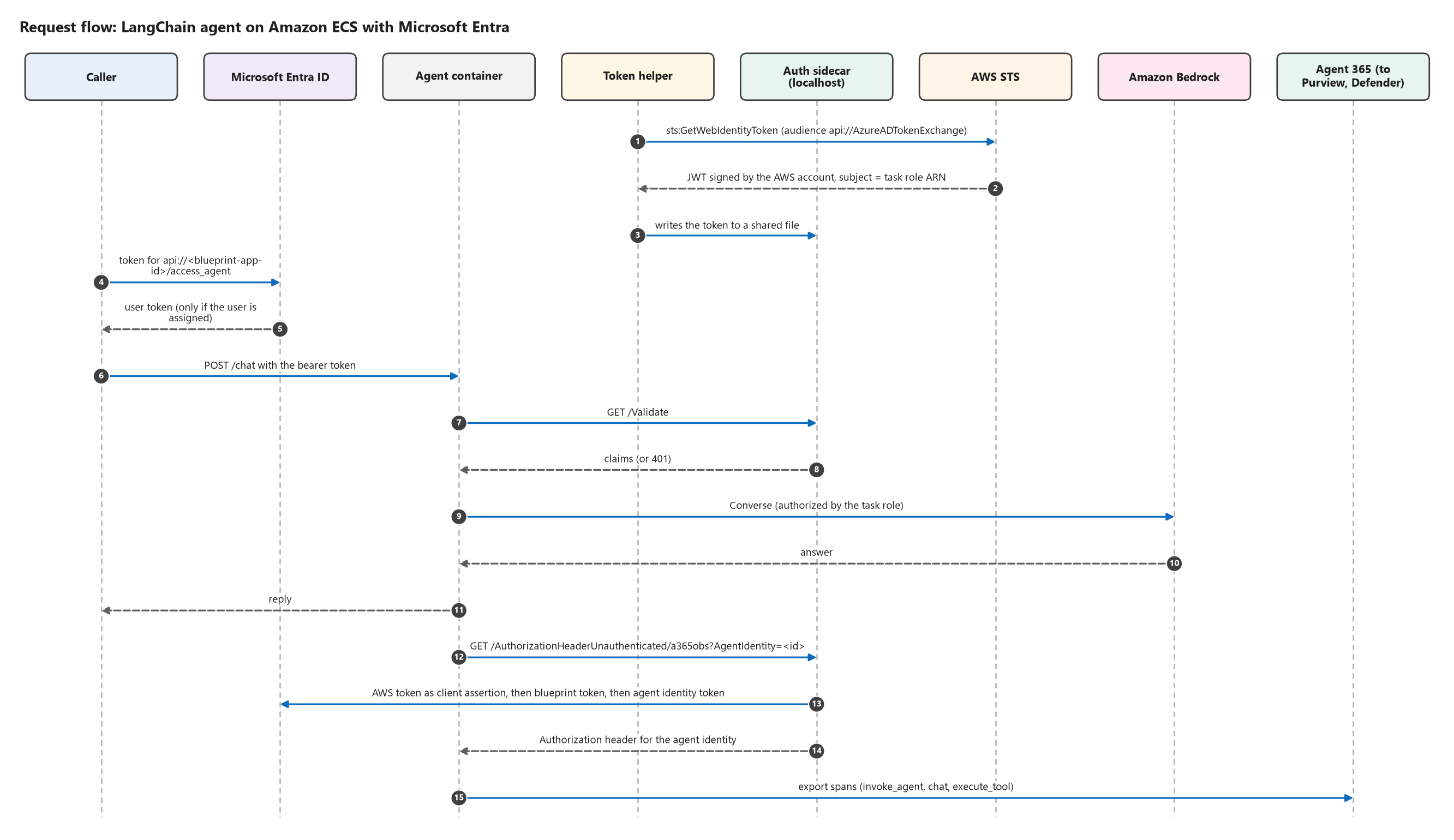
The calls fall into five phases. Each depends on the one before it.
| Phase | When | Who runs it | API or SDK |
|---|---|---|---|
| 0. Prepare AWS | Once per account | AWS administrator | AWS IAM |
| 1. Register | Once per agent | Deployment pipeline | Microsoft Graph |
| 2. Govern | Once per agent | Entra administrator | Microsoft Graph |
| 3. Secure | Every request | The agent’s task | AWS STS, Microsoft Entra SDK for Agent ID (sidecar) |
| 4. Observe | Every request | The agent | Agent 365 observability SDK |
Prerequisites
- An AWS account with Amazon Bedrock model access for the model you choose (some model providers require a one-time use-case form per account).
- A Microsoft tenant with Entra Agent ID and Agent 365 available, and the licensing they require.
- A user who will be the agent’s sponsor.
- An identity for the deployment pipeline with these Microsoft Graph application permissions (admin consent required):
AgentIdentityBlueprint.Create
AgentIdentityBlueprint.Read.All
AgentIdentityBlueprint.AddRemoveCreds.All
AgentIdentityBlueprint.UpdateAuthProperties.All
AgentIdentityBlueprint.DeleteRestore.All
AgentIdentityBlueprintPrincipal.Create
AgentIdentityBlueprintPrincipal.Read.All
AgentIdentityBlueprintPrincipal.DeleteRestore.All
AgentIdentity.Create.All
AgentIdentity.Read.All
AgentIdentity.DeleteRestore.All
AgentRegistration.ReadWrite.All
The Phase 2 steps need more: AppRoleAssignment.ReadWrite.All and AgentIdentityBlueprintPrincipal.ReadWrite.All. Keep those with an administrator instead of the pipeline.
The Graph examples use az rest, which signs requests with the signed-in identity. Any HTTP client with a Graph token works the same way. No Azure subscription is needed to host anything; only the Entra tenant is involved.
Phase 0: Prepare AWS (once per account)
0.1 Enable outbound identity federation and note the issuer
aws iam enable-outbound-web-identity-federation
aws iam get-outbound-web-identity-federation-info
Why: this gives the account its own token issuer, a URL of the form https://<issuer-id>.tokens.sts.global.api.aws. Entra will be told to trust that URL in step 1.4.
Order: first. The issuer URL does not exist until the feature is enabled, and step 1.4 needs it.
0.2 Create the task role with exactly two permissions
{
  "Version": "2012-10-17",
  "Statement": [
    {
      "Sid": "InvokeModel",
      "Effect": "Allow",
      "Action": ["bedrock:InvokeModel", "bedrock:InvokeModelWithResponseStream"],
      "Resource": [
        "arn:aws:bedrock:<region>:<aws-account-id>:inference-profile/<inference-profile-id>",
        "arn:aws:bedrock:*::foundation-model/<foundation-model-id>"
      ]
    },
    {
      "Sid": "EntraFederationAssertion",
      "Effect": "Allow",
      "Action": "sts:GetWebIdentityToken",
      "Resource": "*",
      "Condition": {
        "ForAllValues:StringEquals": { "sts:IdentityTokenAudience": ["api://AzureADTokenExchange"] }
      }
    }
  ]
}
The role’s trust policy allows ecs-tasks.amazonaws.com to assume it.
Why:
sts:GetWebIdentityTokenlets the task ask AWS for a signed token about itself. The condition limits it to the single audience Entra uses for token exchange, so the role cannot mint tokens for any other relying party.- The Bedrock statement names one model. The role can do nothing else.
Note the role’s ARN. It becomes the subject that Entra trusts. Keep the role name stable: if the ARN changes, the trust in step 1.4 must change with it.
Phase 1: Register the agent (Microsoft Graph)
Six calls. The order is fixed because each one needs an id produced by an earlier one.
1.1 Create the agent identity blueprint
az rest --method POST --url "https://graph.microsoft.com/v1.0/applications" \
  --headers "Content-Type=application/json" --body '{
    "@odata.type": "#microsoft.graph.agentIdentityBlueprint",
    "displayName": "<agent-name>-blueprint",
    "sponsors@odata.bind": ["https://graph.microsoft.com/v1.0/users/<sponsor-object-id>"]
  }'
Why: everything else hangs off the blueprint. It will hold the trust in AWS, expose the API that callers request tokens for, and be the parent of the agent identity.
Details that matter: the @odata.type is what makes this a blueprint and not an ordinary app registration. Save id (object id) and appId from the response.
1.2 Expose an API on the blueprint
az rest --method PATCH --url "https://graph.microsoft.com/v1.0/applications/<blueprint-object-id>" \
  --headers "Content-Type=application/json" --body '{
    "identifierUris": ["api://<blueprint-app-id>"],
    "api": { "oauth2PermissionScopes": [{
      "id": "<new-guid>", "value": "access_agent", "type": "User", "isEnabled": true,
      "adminConsentDisplayName": "Access <agent-name>",
      "adminConsentDescription": "Allow the application to call <agent-name> on behalf of the signed-in user.",
      "userConsentDisplayName": "Access <agent-name>",
      "userConsentDescription": "Allow the application to call <agent-name> on your behalf."
    }]}
  }'
Then pre-authorize the client applications users sign in with (here the Azure CLI):
az rest --method PATCH --url "https://graph.microsoft.com/v1.0/applications/<blueprint-object-id>" \
  --headers "Content-Type=application/json" --body '{
    "api": {
      "oauth2PermissionScopes": [ { "...": "the same scope object as above" } ],
      "preAuthorizedApplications": [{
        "appId": "04b07795-8ddb-461a-bbee-02f9e1bf7b46",
        "delegatedPermissionIds": ["<the-scope-guid>"]
      }]
    }
  }'
Why two calls: a scope has to exist before it can be pre-authorized, and the api block is replaced as a whole on every PATCH, so the second call repeats the scope.
1.3 Create the blueprint principal
az rest --method POST --url "https://graph.microsoft.com/v1.0/servicePrincipals" \
  --headers "Content-Type=application/json" --body '{
    "@odata.type": "#microsoft.graph.agentIdentityBlueprintPrincipal",
    "appId": "<blueprint-app-id>"
  }'
Why: access assignments (Phase 2) and the agent identity (1.5) both need it. Entra is eventually consistent, so retry on Request_ResourceNotFound or NoBackingApplicationObject.
1.4 Tell Entra to trust the AWS role (the key call)
az rest --method POST \
  --url "https://graph.microsoft.com/v1.0/applications/<blueprint-object-id>/federatedIdentityCredentials" \
  --headers "Content-Type=application/json" --body '{
    "name": "aws-ecs-task-role",
    "description": "AWS IAM outbound identity federation: ECS task role",
    "issuer": "https://<issuer-id>.tokens.sts.global.api.aws",
    "subject": "arn:aws:iam::<aws-account-id>:role/<task-role-name>",
    "audiences": ["api://AzureADTokenExchange"]
  }'
Why: this one object replaces a client secret. It says: “a token signed by this AWS account, about this IAM role, for this audience, may act as this blueprint”. Nothing is stored on either side that could be copied or leaked.
Details that matter:
issuercomes from step 0.1,subjectis the role ARN from step 0.2.- All three values must match the AWS token exactly, including case.
- Entra accepts only RS256-signed assertions with a single audience. Step 3.1 requests the token accordingly.
1.5 Create the agent identity
az rest --method POST --url "https://graph.microsoft.com/v1.0/servicePrincipals" \
  --headers "Content-Type=application/json" --body '{
    "@odata.type": "#microsoft.graph.agentIdentity",
    "displayName": "<agent-name>",
    "agentIdentityBlueprintId": "<blueprint-app-id>",
    "sponsors@odata.bind": ["https://graph.microsoft.com/v1.0/users/<sponsor-object-id>"]
  }'
Why: this is the identity the agent acts as towards Microsoft services. Save the returned id as <agent-identity-id>.
Order: after 1.3; it fails until the blueprint principal exists.
1.6 Register the agent in the Agent 365 registry
az rest --method POST --url "https://graph.microsoft.com/beta/copilot/agentRegistrations" \
  --headers "Content-Type=application/json" --body '{
    "displayName": "<agent-name>",
    "description": "LangChain chat agent on Amazon ECS with Amazon Bedrock",
    "createdBy": "<sponsor-object-id>",
    "ownerIds": ["<sponsor-object-id>"],
    "sourceAgentId": "<agent-name>",
    "originatingStore": "<how-it-was-created>",
    "sourceCreatedDateTime": "<utc-timestamp>",
    "sourceLastModifiedDateTime": "<utc-timestamp>",
    "agentIdentityBlueprintId": "<blueprint-app-id>",
    "agentIdentityId": "<agent-identity-id>",
    "agentCard": {
      "name": "<agent-name>", "version": "1.0.0",
      "description": "General-purpose chat assistant built with LangChain, hosted on AWS.",
      "capabilities": { "streaming": false, "pushNotifications": false },
      "defaultInputModes": ["text"], "defaultOutputModes": ["text"],
      "skills": [{ "id": "chat", "name": "Chat", "description": "Answers general questions." }]
    }
  }'
Why: this lists the agent in the inventory administrators see (Microsoft 365 admin center > Agents) and ties the entry to the Entra identity. That link is what makes it a managed agent and not just a listed one.
Phase 2: Govern the agent (Entra administrator)
2.1 Add an owner to each object
BODY='{"@odata.id": "https://graph.microsoft.com/v1.0/directoryObjects/<owner-object-id>"}'
az rest --method POST --headers "Content-Type=application/json" --body "$BODY" \
  --url 'https://graph.microsoft.com/v1.0/applications/<blueprint-object-id>/owners/$ref'
az rest --method POST --headers "Content-Type=application/json" --body "$BODY" \
  --url 'https://graph.microsoft.com/v1.0/servicePrincipals/<blueprint-principal-id>/owners/$ref'
az rest --method POST --headers "Content-Type=application/json" --body "$BODY" \
  --url 'https://graph.microsoft.com/v1.0/servicePrincipals/<agent-identity-id>/owners/$ref'
Why: the sponsor is the business owner; the owner is the person who technically manages the objects.
2.2 Decide who may call the agent
az ad group create --display-name "<agent-users-group>" --mail-nickname "<agent-users-group>"

az rest --method POST --headers "Content-Type=application/json" \
  --url "https://graph.microsoft.com/v1.0/servicePrincipals/<blueprint-principal-id>/appRoleAssignedTo" \
  --body '{
    "principalId": "<group-object-id>",
    "resourceId": "<blueprint-principal-id>",
    "appRoleId": "00000000-0000-0000-0000-000000000000"
  }'
Repeat for any non-human caller, such as the pipeline identity that runs smoke tests. If you already have a group for another agent’s users, reusing it gives one place to govern who can use agents wherever they run.
2.3 Turn on “assignment required”
az rest --method PATCH --headers "Content-Type=application/json" \
  --url "https://graph.microsoft.com/v1.0/servicePrincipals/<blueprint-principal-id>/microsoft.graph.agentIdentityBlueprintPrincipal" \
  --body '{ "appRoleAssignmentRequired": true }'
Why: Entra now refuses to issue a token for the agent to anyone who is not assigned (error AADSTS50105). The decision is made by the identity provider before a request ever reaches AWS.
Order: after 2.2, or you lock out your own callers.
2.4 Let the agent identity send telemetry to Agent 365
az ad sp show --id 9b975845-388f-4429-889e-eab1ef63949c \
  --query "{resourceId:id, role:appRoles[?value=='Agent365.Observability.OtelWrite'].id | [0]}"

az rest --method POST --headers "Content-Type=application/json" \
  --url "https://graph.microsoft.com/v1.0/servicePrincipals/<observability-sp-id>/appRoleAssignedTo" \
  --body '{
    "principalId": "<agent-identity-id>",
    "resourceId": "<observability-sp-id>",
    "appRoleId": "<otelwrite-role-id>"
  }'
Why: Agent 365 accepts telemetry only from an identity holding Agent365.Observability.OtelWrite.
Order: before the task first starts. The sidecar caches tokens; one issued before the grant has no role until it is refreshed or the task restarts.
2.5 Review access on a schedule (recommended)
Create an Entra ID Governance access review on the users group (POST /identityGovernance/accessReviews/definitions) with a quarterly recurrence, the group owners as reviewers, and a default decision of Deny that is applied automatically. Anyone not confirmed loses access.
A note on the model
On AWS the model call is authorized by AWS IAM (the task role from step 0.2), not by the Entra agent identity. There is no Entra permission to grant for Bedrock. The Entra identity governs who may call the agent and attributes everything the agent does in Agent 365; IAM governs what the task may touch inside AWS.
Phase 3: Secure every request (AWS STS and the Entra auth sidecar)
3.1 Token helper: get the AWS-signed token
import os, time, boto3

sts = boto3.client("sts", region_name=os.environ["AWS_REGION"])
TOKEN_FILE = "/var/run/entra/aws-token"

def refresh() -> None:
    token = sts.get_web_identity_token(
        Audience=["api://AzureADTokenExchange"],
        SigningAlgorithm="RS256",          # the only algorithm Entra accepts here
        DurationSeconds=3600,
    )["WebIdentityToken"]
    tmp = TOKEN_FILE + ".tmp"
    with open(tmp, "w", encoding="ascii") as f:
        f.write(token)
    os.chmod(tmp, 0o644)                   # the sidecar runs as a different user
    os.replace(tmp, TOKEN_FILE)            # atomic: never a half-written file

while True:
    refresh()
    time.sleep(600)                        # refresh well before the token expires
Why: this is the AWS half of the trust created in step 1.4. The token’s issuer is the account’s issuer, its subject is the task role ARN, and its audience is the Entra token-exchange audience.
Details that matter:
- Write atomically and make the file readable by the sidecar’s user.
- Log the token’s non-secret claims (
iss,sub,aud) once per refresh. When federation fails, comparing these with the federated credential finds the mismatch in seconds.
3.2 Configure the sidecar to use that file
ASPNETCORE_URLS                                              = http://127.0.0.1:5000
AllowedHosts                                                 = localhost;127.0.0.1
AzureAd__Instance                                            = https://login.microsoftonline.com/
AzureAd__TenantId                                            = <tenant-id>
AzureAd__ClientId                                            = <blueprint-app-id>
AzureAd__ClientCredentials__0__SourceType                    = SignedAssertionFilePath
AzureAd__ClientCredentials__0__SignedAssertionFileDiskPath   = /var/run/entra/aws-token
AzureAd__AllowWebApiToBeAuthorizedByACL                      = true

DownstreamApis__a365obs__BaseUrl                             = https://agent365.svc.cloud.microsoft/
DownstreamApis__a365obs__Scopes__0                           = api://9b975845-388f-4429-889e-eab1ef63949c/.default
DownstreamApis__a365obs__RequestAppToken                     = true
Why each part:
ClientIdis the blueprint;SignedAssertionFilePathtells the sidecar to authenticate as the blueprint with the token in the file. On Azure the same setting would point at a managed identity; this is the only identity difference between the two clouds.- The
a365obsentry is the downstream API the agent needs an agent identity token for. AllowWebApiToBeAuthorizedByACLlets app-only callers through validation; the agent then authorizes them by application id.- Bind to
127.0.0.1and give the sidecar no port mapping. Its token endpoint is unauthenticated by design and must be reachable only inside the task.
3.3 Start the containers in the right order
In the ECS task definition:
- token-helper: has a health check that passes once the token file exists and is not empty.
- auth-sidecar:
dependsOnthe token helper beingHEALTHY; mounts the shared volume read-only. - agent:
dependsOnthe sidecar having started.
Why: the sidecar cannot authenticate until the first token has been written. Without this ordering the first requests after a deployment fail.
3.4 Validate the caller: GET /Validate
resp = httpx.get(f"{SIDECAR_URL}/Validate",
                 headers={"Authorization": request.headers["authorization"], "Host": "localhost"})
if resp.status_code == 401:
    raise HTTPException(401, "invalid token")
claims = resp.json()["claims"]

scopes = str(claims.get("scp", "")).split()
caller_app = str(claims.get("azp") or claims.get("appid") or "").lower()
if "access_agent" in scopes:                                # a user, through an approved client
    pass
elif not scopes and caller_app in ALLOWED_CALLER_APP_IDS:   # an allow-listed application
    pass
else:
    raise HTTPException(403, "caller is not authorized for this agent")
Why: the sidecar checks signature, issuer, tenant, expiry and audience (the blueprint). The agent only decides what validated claims may do. This is the first thing on every request.
3.5 Get a token as the agent: GET /AuthorizationHeaderUnauthenticated/{api}
def sidecar_token(api_name: str, agent_identity_id: str) -> str:
    resp = httpx.get(f"{SIDECAR_URL}/AuthorizationHeaderUnauthenticated/{api_name}",
                     params={"AgentIdentity": agent_identity_id},
                     headers={"Host": "localhost"})
    resp.raise_for_status()
    return resp.json()["authorizationHeader"].split(" ", 1)[1]
What happens behind this one call:
- The sidecar reads the AWS-signed token from the file.
- It presents it to Entra as the blueprint’s client assertion and receives a blueprint token.
- It exchanges that for a token for the agent identity, scoped to the downstream API.
Decoding the result shows an Entra token whose oid is the agent identity and whose parent application is the blueprint: an Entra identity token, obtained by a container on AWS, with no secret. Cache it until a few minutes before it expires.
3.6 Call the model
from langchain_aws import ChatBedrockConverse

llm = ChatBedrockConverse(model="<inference-profile-id>", region_name="<region>")
No key appears here either: the AWS SDK uses the task role’s credentials.
3.7 What a caller does
TOKEN=$(az account get-access-token --scope "api://<blueprint-app-id>/access_agent" --query accessToken -o tsv)

curl -s -X POST "https://<agent-endpoint>/chat" \
  -H "Authorization: Bearer $TOKEN" -H "Content-Type: application/json" \
  -d '{"message": "What time is it in UTC?", "session_id": "demo"}'
Without the header the agent returns 401. A user outside the group never gets a token (AADSTS50105). If the agent has no public endpoint, make the call from inside the VPC.
Phase 4: Observe every request (Agent 365 observability SDK)
This phase is identical to an Azure-hosted agent. Hosting on AWS changes nothing in the code.
4.1 Install and pin
microsoft-opentelemetry[langchain]Pin exact versions of this package and of langchain, langchain-core, langgraph and langchain-aws, and re-test when you bump them. The LangChain instrumentation is version-sensitive, and when it does not attach it fails silently.
4.2 Switch telemetry on, before the app objects exist
from microsoft.opentelemetry import use_microsoft_opentelemetry

use_microsoft_opentelemetry(
    resource=Resource.create({
        "service.name": AGENT_NAME, "service.version": APP_VERSION,
        "cloud.provider": "aws", "cloud.platform": "aws_ecs", "cloud.region": AWS_REGION,
    }),
    enable_a365=True,
    a365_enable_observability_exporter=True,
    a365_use_s2s_endpoint=True,            # app-only token of the agent identity
    a365_token_resolver=token_resolver,    # see 4.3
    enable_sensitive_data=True,            # include prompts and responses
    instrumentation_options={"langchain": {"enabled": True}},
)
Why each setting:
enable_a365and the exporter send spans to Agent 365, which routes them to Purview, Defender and the Microsoft 365 admin center. The agent never calls Purview directly.a365_use_s2s_endpoint=Truemeans the agent authenticates as itself, not on behalf of a user.enable_sensitive_data=Trueis the governance decision in this file. Without it prompts and responses are not recorded, and compliance tooling has nothing to inspect. With it, treat the telemetry as sensitive data.- The LangChain option creates the model (
chat) and tool (execute_tool) spans automatically, including for the Bedrock model.
Order: call this before creating the web app and the LangChain objects. Objects created earlier are not instrumented.
4.3 Give the exporter a token: the token resolver
def token_resolver(agent_id: str, tenant_id: str) -> str | None:
    with suppress_instrumentation():          # do not trace the token request itself
        return sidecar_token("a365obs", agent_id)
Why: the exporter authenticates to Agent 365 as the agent identity. This is where the whole chain is exercised end to end: AWS token, federated credential, blueprint token, agent identity token, OtelWrite role.
4.4 Wrap each request in an invoke_agent span
from microsoft.opentelemetry.a365.core import (
    AgentDetails, BaggageBuilder, CallerDetails, Channel,
    InvokeAgentScope, InvokeAgentScopeDetails, Request, UserDetails)

AGENT = AgentDetails(agent_id=AGENT_IDENTITY_ID, agent_name=AGENT_NAME,
                     agent_blueprint_id=BLUEPRINT_APP_ID, tenant_id=TENANT_ID,
                     agent_version=APP_VERSION, provider_name="LangChain")

baggage = (BaggageBuilder()
           .tenant_id(TENANT_ID).agent_id(AGENT_IDENTITY_ID).agent_blueprint_id(BLUEPRINT_APP_ID)
           .conversation_id(conversation_id).session_id(session_id)
           .user_id(claims["oid"]).user_email(claims.get("preferred_username"))
           .build())
request = Request(content=message, session_id=session_id,
                  conversation_id=conversation_id, channel=Channel(name="http-api"))
caller = CallerDetails(user_details=UserDetails(user_id=claims["oid"],
                                                user_email=claims.get("preferred_username")))

with baggage, InvokeAgentScope.start(request, InvokeAgentScopeDetails(), AGENT, caller) as scope:
    scope.record_input_messages(message)
    result = agent.invoke({"messages": [{"role": "user", "content": message}]}, config)
    scope.record_output_messages(reply_text)
Why:
InvokeAgentScopeis the root span: “this caller invoked this agent with this request”.BaggageBuildercopies the identity attributes onto every child span, so each model and tool call is attributed to the same agent, tenant, conversation and caller.- The caller details come from the claims validated in step 3.4, so the audit trail names an authenticated person.
4.5 Check that Agent 365 accepts the telemetry
# At startup: does this tenant accept telemetry from this agent?
httpx.get(f"https://agent365.svc.cloud.microsoft/observabilityService/tenants/{TENANT_ID}/eligibility?api-version=1",
          headers={"Authorization": f"Bearer {token}"})
Also set the logger microsoft.opentelemetry.a365.core.exporters.agent365_exporter to DEBUG. Each export then logs the HTTP status and a per-destination result ("status": "sent") in the task’s CloudWatch logs. That is the direct evidence that telemetry left AWS and was accepted. Data can take several minutes longer to appear in the Defender and Purview portals.
4.6 Where it shows up
| Place | What to look for |
|---|---|
| Microsoft 365 admin center > Agents | The agent’s registry entry and activity |
| Microsoft Purview > DSPM > AI observability, and Audit | Interactions, prompts and responses, by agent and by user |
| Microsoft Defender > Advanced hunting | CloudAppEvents with action types InvokeAgent, InferenceCall, ExecuteToolBySDK |
CloudAppEvents
| where Timestamp > ago(1d)
| where ActionType in ("InvokeAgent", "InferenceCall", "ExecuteToolBySDK")
| where tostring(RawEventData) has "<agent-identity-id>"
| order by Timestamp desc
The order, and what breaks if you change it
| # | Call | Must come after | If skipped or out of order |
|---|---|---|---|
| 1 | Enable AWS outbound identity federation | — | No issuer; the task cannot get a signed token |
| 2 | Create the task role (sts:GetWebIdentityToken, Bedrock) | 1 | No subject for Entra to trust |
| 3 | Create blueprint | — | Nothing else in Entra can be created |
| 4 | Add API scope, then pre-authorize clients | 3 | Callers cannot request a token |
| 5 | Create blueprint principal | 3 | No agent identity, no access assignments |
| 6 | Add federated credential (AWS issuer + role ARN) | 1, 2, 3 | The sidecar cannot authenticate as the blueprint |
| 7 | Create agent identity | 5 | The agent has no identity to act as |
| 8 | Register in Agent 365 | 3, 7 | Not in the inventory, or not linked to its identity |
| 9 | Owners; assign users group and callers | 5, 7 | No accountable owner; nobody can be granted access |
| 10 | Assignment required | 9 | Before 9: everyone is locked out. Never: anyone in the tenant can get a token |
| 11 | OtelWrite for the agent identity | 7 | Telemetry is rejected; tokens cached earlier lack the role |
| 12 | Start the task: helper, then sidecar, then agent | 6, 7, 11 | First requests fail until the token file exists |
| 13 | use_microsoft_opentelemetry | before app objects are created | Model and tool spans are missing |
| 14 | Per request: /Validate, then the invoke_agent scope, then the model call | 12, 13 | Unauthenticated use, or activity with no caller attached |
Common problems
| Symptom | Cause | Fix |
|---|---|---|
| Sidecar cannot get a token; Entra reports no matching federated identity record | Issuer, subject or audience differs from the AWS token (often case, or a renamed role) | Compare the helper’s logged iss/sub/aud with step 1.4 |
sts:GetWebIdentityToken is denied | Federation not enabled, or the audience condition does not match | Steps 0.1 and 0.2 |
| Entra rejects the assertion | Token not RS256, or more than one audience | Request it as in step 3.1 |
| Sidecar fails at startup, then recovers | It started before the first token was written | Container ordering, step 3.3 |
Request_ResourceNotFound right after creating an Entra object | Replication delay | Retry for up to a minute |
Sign-in fails with AADSTS50105 | Caller is not assigned to the blueprint principal | Add them to the group |
| Exports rejected, or eligibility returns 403 | OtelWrite missing, or token cached before the grant | Step 2.4, then restart the task |
Agent works but there are no chat / execute_tool spans | LangChain instrumentation did not attach | Pin versions; call telemetry setup first |
| Bedrock returns an access error about use-case details | The model provider requires a one-time form per account | Submit it, or choose another model |
For comparison: listing native AWS agents without the SDKs
Agent 365 can also discover agents built directly in Amazon Bedrock (Agents and AgentCore) through Connected platforms in the Microsoft 365 admin center (Agents > All Agents > Connected platforms > Connect a platform > Amazon Bedrock). It reads agent metadata from AWS with a read-only identity that needs:
ec2:DescribeRegions
bedrock:ListAgents, bedrock:GetAgent
bedrock-agentcore:ListHarnesses, bedrock-agentcore:GetHarness
bedrock-agentcore:ListAgentRuntimes, bedrock-agentcore:GetAgentRuntime
The two approaches answer different questions:
| Registry sync (Connected platforms) | SDK integration (this article) | |
|---|---|---|
| Agent appears in the Agent 365 inventory | Yes | Yes |
| Own Entra agent identity, owner and sponsor | No | Yes |
| Entra decides who may call the agent | No | Yes |
| Activity and audit trail | Optional: Agent 365 can read activity from the agent’s AWS logs once that is configured on the AWS side | Yes: every request, model call and tool call is sent by the agent, attributed to its Entra identity and to the authenticated caller |
| Code changes to the agent | None | A sidecar, a small helper and a telemetry module |
| Credential used | A long-lived AWS access key held by Agent 365 | None stored anywhere |
Sync is the quick way to see what exists. The SDK path is what makes an agent governed. They work well together: sync for discovery, SDK integration for the agents that matter.
What this gives you
- No secrets, in either cloud. AWS signs a short-lived token about the task; Entra trusts it for one role and one audience.
- A real Entra identity for an AWS workload, with a sponsor and an owner, that can be reviewed, restricted or disabled like any other identity.
- Access control enforced by Entra before a request reaches AWS.
- One audit trail in Purview and Defender for agents wherever they run.
About 40 lines of helper code and one federated credential are the whole AWS-specific part. Everything else is the same as for an agent hosted on Azure.
¶ Discussion
Comments are powered by Giscus / GitHub Discussions. They appear here once configured — see
Configure Giscusin the project README and updateGISCUSinsrc/consts.ts.